DIE BESTE STROMVERSORGUNG FÜR RTX 5090
Gehäuse und Komponenten
NVIDIA has officially unveiled the RTX 50 Series GPUs, and as anticipated, they come with high power demands—the RTX 5090 alone draws up to 575W and it operates with a 12V-2x6 connector.
However, this the RTX 5090 pushing the 600W limit of this connector closely. That means it’s more important than ever to ensure your PSU is up to the task.
Now, let’s take a closer look at what the RTX 5090 truly requires.
RTX 5090 system power supply requirements

a) Interface: PCIe 5.0 x16
b) Connector: 12V-2x6 (600W)
c) System Power Wattage:
b) Connector: 12V-2x6 (600W)
c) System Power Wattage:
Choosing a power supply with a higher wattage than your graphics card requires offers several advantages:
- When the power supply operates at 60%–80% load, its conversion efficiency is typically higher than when running at 90% load, reducing energy consumption and heat generation.
- Running the power supply at a lower load ensures a more stable power output, minimizes stress, which positively impacts power supply lifespan.
- Provides flexibility for future upgrades to higher-power graphics cards without needing to replace the power supply.
-
-
Core Ultra 5
Core Ultra 7
Core Ultra 9
AI/ Intel HEDT
-
-
Ryzen 9000 R5
Ryzen 9000 R7/ X3D
Ryzen 9000 R9/ X3D
AI/ AMD TR
RTX 5090
Recommend
1250W
1300W
1600W
1600W
RTX 5090
Standard
1000W
1000W
1000W
1000W
d) GPU Peak Power Excursion:
Require ATX 3.1 power supply, for more safety to handle the GPU power excursion.
Require ATX 3.1 power supply, for more safety to handle the GPU power excursion.
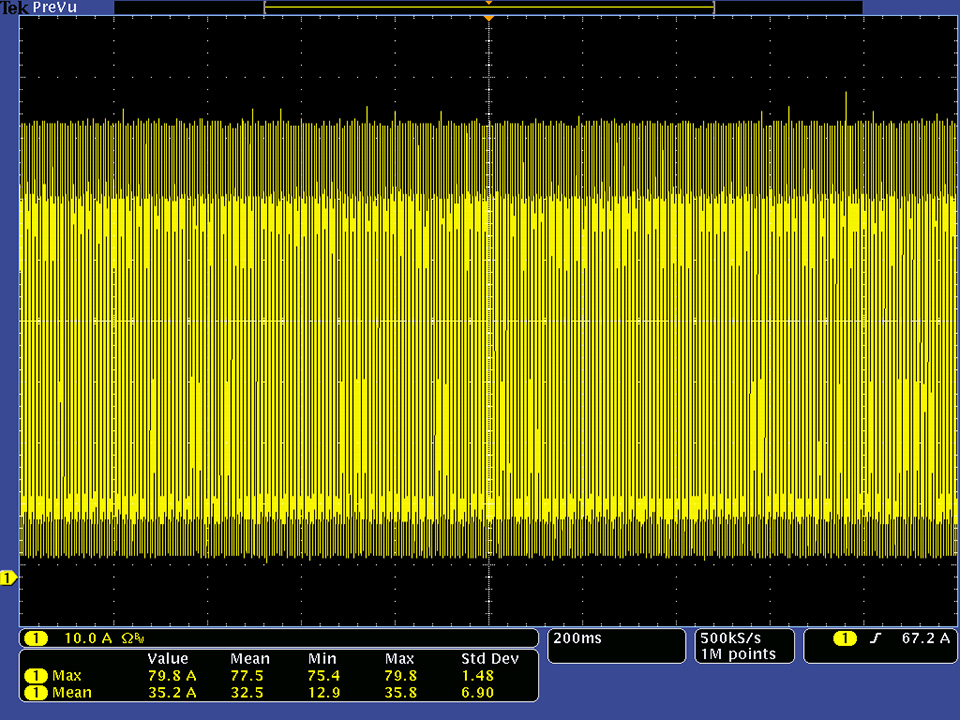
*Mean Value: 35.2A x 12V = 420W, Max Value: 79.8A x 12V = 957.6W
RTX 5090 power consumption
1. Game test (+12V)
-
Max Total Power (W)
Mean Total Power (W)
Black Myth: Wukong
1195.2
679.6
Monster Hunter Wilds
1200.6
643.2
2. 2 x RTX 5090 Power test
-
Max Total Power (W))
Mean Total Power (W)
OCCT ( 575W x 2 )
1737.5
1450.5
*CPU: AMD Ryzen 9 9950X
*MPG X870E CARBON WIFI
*GeForce RTX 5090 32G VANGUARD
*MPG X870E CARBON WIFI
*GeForce RTX 5090 32G VANGUARD
PSU recommended
Best PSU for RTX 5090 – MEG Ai1600T PCIE5
Testing results show that the two RTX 5090 cards, along with standard PC components, consumes well below 1500 watts* of the mean total power. However, given its extreme price and power, it will likely be used in high-end custom builds—systems featuring dual water-cooling loops, multiple fans, two motherboards, and more. For such setups, A more stable and durable power supply is needed, the MEG Ai1600T PCIE5 is the ideal choice. It boasts SiC MOSFETs ensuring top-tier efficiency and reliability.
*Refer to 2 x RTX 5090 Power test table
Best 1300 Watt PSU for RTX 5090 – MEG Ai1300P PCIE5 /MPG A1250GS PCIE5
If you're building a gaming PC using a mid-tower case with front-panel PD fast charging, a 1300W or a 1250W PSU will be sufficient. The MEG Ai1300P PCIE5 offers Platinum efficiency certification and features Gaming Intelligence software for real-time monitoring. As for the MPG A1250GS PCIE5, the “S” in its name stands for Silent and denotes its Gold efficiency certification, emphasizing high performance with lower noise. It has been upgraded to 1250W power delivery and includes dual 12V-2x6 connectors to support high-end GPU computing and dual-GPU systems for AI demands.
Best Performance Value PSU for RTX 5090 – MPG A1000GS PCIE5
For a standard PC build, the MPG A1000GS PCIE5 power supply provides a minimum capacity of 1000W with high-quality components, including premium capacitors and FETs. Its low ripple noise ensures stable power delivery, and it can handle up to 235% total power excursion during graphics card operation. Additionally, it features 80 PLUS Gold certification, quiet operation, and is fully ATX 3.1 ready.
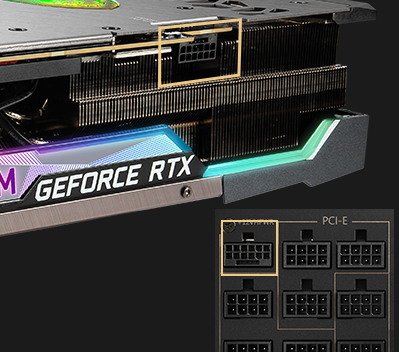
As RTX 5090 graphics cards require higher power delivery, upgrading to new original or high-quality power cables is crucial to fully unleash their outstanding performance and stability. The previously mentioned power supplies not only provide a native 12V-2x6 connector but also feature a dual-color connector design, enabling users to quickly and easily verify that the cable is fully inserted.
Not fully inserted

Fully inserted

GPU 12V-2x6 Connection Tips
Recommended, use native 12V-2x6 connector
Fully inserted

Use adapter


For more information:
MEG Ai1600T PCIE5:
https://www.msi.com/Power-Supply/MEG-Ai1600T-PCIE5
MEG Ai1300P PCIE5:
https://www.msi.com/Power-Supply/MEG-Ai1300P-PCIE5
MPG A1250GS PCIE5:
https://www.msi.com/Power-Supply/MPG-A1250GS-PCIE5
MPG A1000GS PCIE5:
https://www.msi.com/Power-Supply/MPG-A1000GS-PCIE5
https://www.msi.com/Power-Supply/MEG-Ai1600T-PCIE5
MEG Ai1300P PCIE5:
https://www.msi.com/Power-Supply/MEG-Ai1300P-PCIE5
MPG A1250GS PCIE5:
https://www.msi.com/Power-Supply/MPG-A1250GS-PCIE5
MPG A1000GS PCIE5:
https://www.msi.com/Power-Supply/MPG-A1000GS-PCIE5