


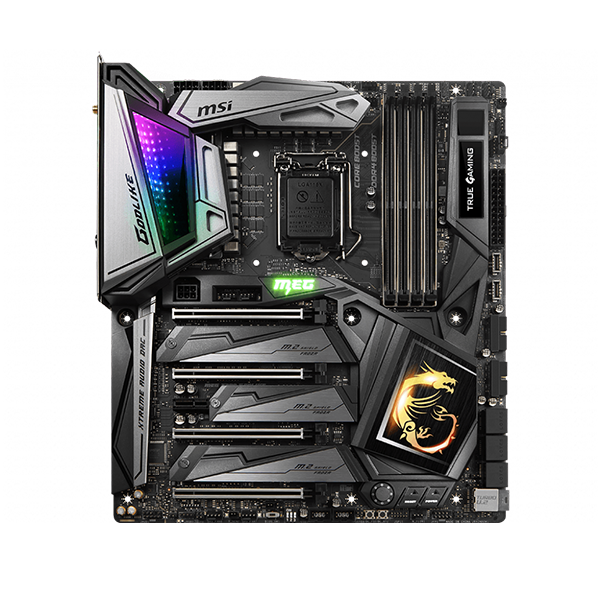


Wie überprüfe ich die Grafikkartenspezifikation?
Bitte besuchen Sie die MSI-Website, um die Anzahl und die Spezifikation des PCIe_x16-Steckplatzes mit der Motherboard-Spezifikation zu überprüfen . Bestätigen Sie außerdem bitte die PCI-Express-Parameter. Wenn die Spezifikationen zeigen, dass sie mit der Grafikkartenspezifikation kompatibel sind, die PCI-Express-Bandbreite und das Protokoll der Grafikkarte, die mit dem Motherboard übereinstimmen, sollte das Motherboard in den meisten Fällen mit Ihrer Grafikkarte kompatibel sein. Sie können die vollständigen Produktinformationen auch als PDF-Datei herunterladen .
● Motherboard-Spezifikation
o Gehen Sie zur offiziellen MSI-Website, suchen Sie Ihr Motherboard und laden Sie den Treiber herunter.
o Zum Beispiel: Z370 SLI PLUS, geben Sie den Produktnamen in die obere rechte Suchleiste ein, drücken Sie [Enter].

o Das übereinstimmende Ergebnis für „Z370 SLI PLUS“ wird angezeigt, wählen Sie [Spezifikation]

o Gehen Sie zur Registerkarte [Produktspezifikationen] und sehen Sie sich PCI_E x16 und PCI-E Gen an. Es gibt 3 PCI_E-Sockel für dieses Motherboard hier und der PCI_E x16-Standard ist 3.0 Generation 3)

o Laut obiger Information soll die [GeForce GTX 2070 GAMING Z 8G] auch die [Z370 SLI PLUS] unterstützen, da diese über die gleiche Schnittstellenspezifikation verfügen
● Motherboard-Spezifikation
o Geben Sie den Modellnamen in die Suchleiste oben rechts auf der offiziellen MSI-Website ein
o Zum Beispiel: Geben Sie Z370 SLI PLUS in das Symbol [Suchen] ein, drücken Sie die Taste [Enter], um das passende Ergebnis zu finden.

o Klicken Sie auf die Schaltfläche [Kompatibilität] unterhalb des Produktnamens

o Klicken Sie auf [VGA] für die kompatible Grafikkarte

o Check if your graphics card model is listed here, it means it is compatible to this motherboard

o According to the information above, [GeForce GTX 2070 GAMING Z 8G] is supported to the [Z370 SLI PLUS]
● Graphics card specifications
o Input the model name on the top right corner’s search bar at MSI official website
o For example: input GeForce GTX 2070 GAMING Z 8G in the [Search] icon, press [Enter] key to find the matching result.

o Click on the [Specifications] button down below the product name

● Download PDF file in [DataSheet]
o Click「DataSheet」 to download PDF file

o Check production detail information in PDF format, you may also download it

BASIC |
DATASHEET |
Detailed specification |
Model Name |
GeForce RTX? 2070 GAMING Z 8G |
Description of the product name or model of the graphics card. |
Graphics Engine |
NVIDIAR GeForce RTX? 2070 |
Chip vender and chip model of the graphics card. |
Interface |
PCI Express x16 3.0 |
The interface type of the graphics card: PCI-E x16 3.0, PCI-E (Peripheral Component Interconnect-Express) is the serial interface standard, and X16 means 16 channels, which belongs to the serial bus. The serial interface is mainly 1.0, 2.0, and 3.0. The difference between each version is only the difference in bandwidth (The greater the amount of data is, the faster the bandwidth is), and they are compatible with the 3.0 version, 2.0 version and 1.0 version. |
Cores |
2304 Units |
The display chip parallel computing architecture (SP (Stream Processor) unit is 2304, the SP unit is the core of the graphics card, directly related to the rendering technology processing, the more the number of the SP units is, the stronger the processing capacity. |
Memory |
8GB GDDR6 |
Memory capacity:8GB. Memory type:GDDR6. Memory is the number of local display capacity on the graphics card, which determines the ability to store temporary data, which affects the performance of the video card to a certain extent. In general, the memory capacity of the graphics card is determined by its display chip. |
Core Clock Speed(MHz) |
Boost: 1830 MHz |
The core acceleration frequency of the graphics card is 1830 MHz, the frequency that can be accelerated under Boost technology. |
Memory Clock Speed(MHz) |
14 Gbps |
The frequency of operation on the graphics card is 14 Gbps, memory frequency, to some extent, the speed of the memory should be reversed. |
Memory Interface |
256-bit |
The memory interface is 256 bits and the memory bit width is the number of bits that can be transferred within one clock cycle. The larger the number of bits, the greater the amount of data that can be transmitted at a moment. |
Output |
DisplayPort x 3 (v1.4) / HDMI 2.0b x 1 / USB Type-C x1 |
This graphics card I / O port has three version 1.4 DisplayPort interfaces, one version 2.0 HDMI port, and one USB Type-C interface. The information processed by the graphics card is ultimately output to the screen, and the interface output by the graphics card is the bridge between the computer host and the display, which is mainly responsible for outputting the corresponding image signal to the screen. |
HDCP Support |
2.2 |
This graphics card supports high-bandwidth digital content protection 2.2 specification technology, and HDCP (High-Bandwidth Digital Content Protection) is a major role in ensuring that the HDMI port is not illegally recorded when transmitting digital video and audio signals. |
Power consumption (W) |
225 W |
Shows that the total power consumption required for all components of the adapter to operate is 225W. |
Power Connectors |
8-pin x 1, 6-pin x 1 |
The graphics card power interface type is 1 8pin and 1 6pin. |
Recommended Power Supply (W) |
550W |
The host computer is matched with the recommended selection of 550W power supply. |
Card Dimension(mm) |
295 x 140 x 56 mm |
graphics card size specification, that is, (long) 295x (wide) 140x (high) 56 mm. |
Weight |
1485 g / 2033 g |
The weight of the graphics card is 1485g, including 2033 g of the case. |
Afterburner OC |
Y |
Support MSI Afterburner software tools to achieve overfrequency. |
DirectX Version Support |
12 API |
The DirectX support version is the 3D 12 API, the API is the Application Programming Interface (API) application programming interface, and the API enables the 3D software designed by the programmer to call the program within its API so that the API automatically communicates with the driver of the hardware to start the powerful 3D graphics processing capability within the 3D chip. |
OpenGL Version Support |
4.5 |
OpenGL support version 4.5, (Open Graphics Library) is mainly used to render 2D, 3D vector graphics cross-language, cross-platform application programming interface. |
Maximum Displays |
4 |
The graphics card supports up to 4 screen output. |
VR Ready |
Y |
graphics card supports virtual reality technology. VR (Virtual Reality) virtual reality technology is a kind of computer simulation technology to experience virtual world. The simulation system of its entity behavior can immerse users in this environment. |
G-SYNCR technology |
Y |
With the NVIDIA G-SYNC R display technology, the main feature is by synchronizing the display update rate with the GeForce GPU in the graphics card, reducing the display Catton phenomenon and the input delay, eliminating visual artifacts, and enjoying the original image and the excellent game screen. |
Adaptive Vertical Sync |
Y |
The graphics card supports automatic switching vertical synchronization based on the number of frames. |
Digital Maximum Resolution |
7680 x 4320 |
Die höchste digitale Auflösung beträgt 7680 x 4320. Die Anzeigeauflösung bezieht sich auf die Anzahl der auf dem Bildschirm angezeigten Pixel. Die Auflösung von 7680 x 4320 bedeutet 7680 Pixel in horizontaler Richtung und 4320 Pixel in vertikaler Richtung. Bei gleicher Bildschirmgröße gilt: Je höher die Auflösung, desto feiner und feiner der Anzeigeeffekt. |
Zubehör |
Grafikkartenhalterung x 1 |
Zubehör für Verpackungsboxen - mit einem Grafikkarten-Stützrahmen. |